

What Is Dynamics 365 Customer Insights?
Dynamics 365 Customer Insights is Microsoft’s customer data and journey orchestration offering. It helps organisations bring together data from separate systems, create more usable customer profiles, and use those profiles to support targeted engagement and operational decisions. It includes two connected capabilities: Customer Insights – Data for data unification and Customer Insights – Journeys for customer communications and journeys.
For a concise product definition, Microsoft’s Customer Insights overview explains how the service combines unified customer data with real-time journey orchestration. Available functionality depends on licensing, tenant configuration, Microsoft service availability, integrations, implementation design, and security settings.
BeyondCRM works alongside existing IT providers to connect Dynamics 365 with the systems an organisation already relies on, rather than treating CRM as a replacement for every platform.
I’m Warren Davies, Founder of BeyondCRM, with more than 30 years of experience in Microsoft Dynamics CRM consulting. I guide organisations in designing dependable data architectures that deliver clear business visibility.
Key Takeaways
- Customer Insights combines data and engagement: Data unification and customer journeys serve different but connected purposes.
- Customer Insights – Data creates usable profiles: It brings together records, applies matching rules, and supports segments, measures, and exports.
- Customer Insights – Journeys activates audiences: It can support event-driven, multi-channel communications when the relevant services are configured.
- Data quality shapes the outcome: Clear source ownership, matching rules, consent, and governance matter as much as the technology.
- Implementation decisions should come first: Licensing, security, integrations, and the intended operating model should be reviewed before rollout.
How Dynamics 365 Customer Insights Works: Data and Journeys
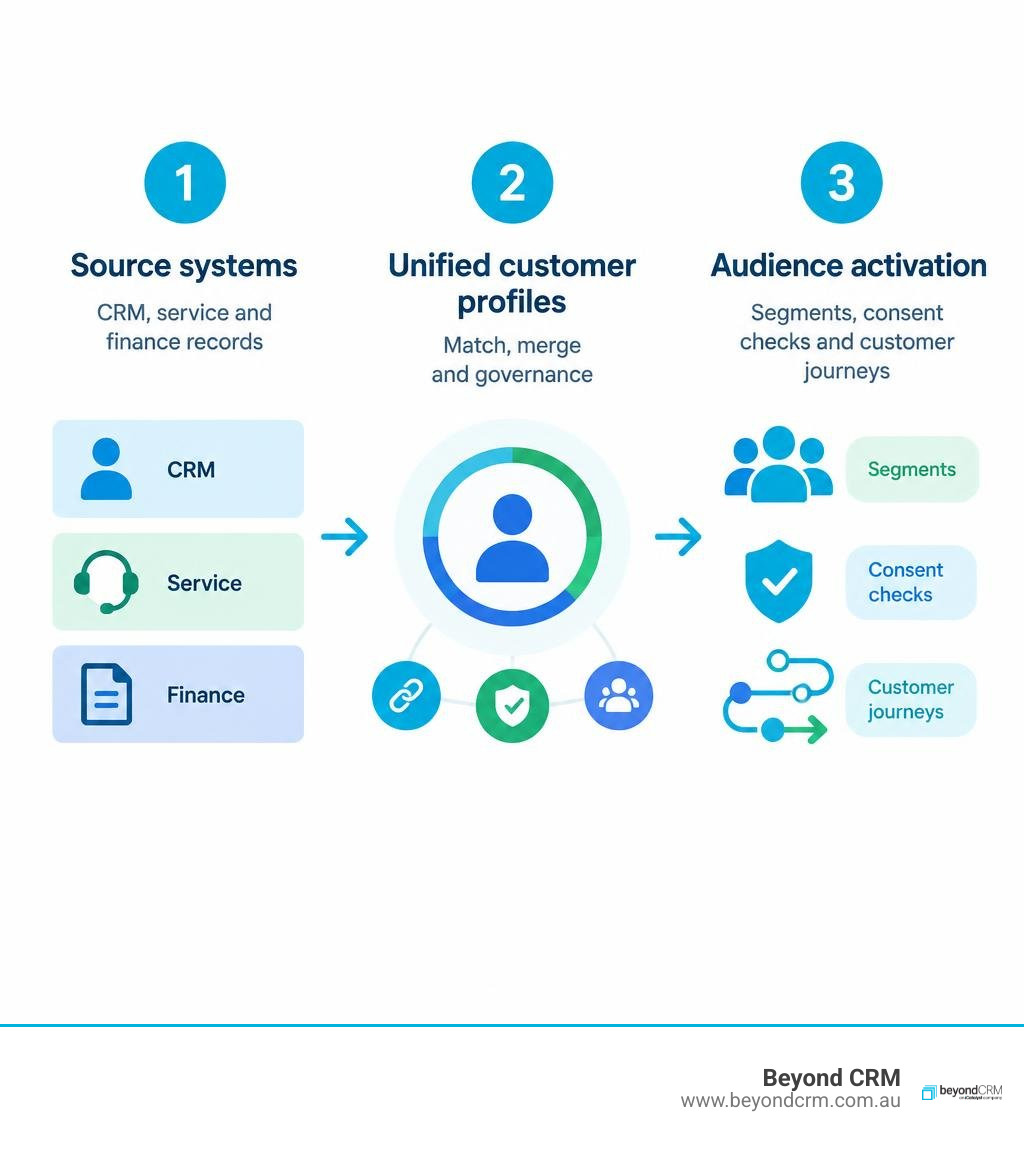
Dynamics 365 Customer Insights helps organisations turn disconnected customer records into profiles that are easier to use across sales, service, marketing, and operations. It is most useful when teams need to understand the same customer across several systems without manually reconciling records at every interaction.

Most established organisations store data across separate systems. Sales teams log interactions in CRM platforms, finance teams record invoices in ERP databases, and customer service teams track support requests in dedicated portals.
Customer Insights resolves identities across these separate systems. When configured appropriately, this unified view helps customer-facing staff make informed decisions during live interactions. A service consultant can review recent order history and predicted satisfaction levels before answering enquiries.
Platform capabilities depend on licensing, tenant configuration, implementation design, and security permissions.
Distinguishing Customer Insights – Data from Customer Insights – Journeys
Customer Insights has two connected capabilities. The simplest distinction is that Customer Insights – Data prepares and enriches customer data, while Customer Insights – Journeys uses agreed audience data and business triggers to coordinate engagement.
Customer Insights – Data focuses on ingestion, identity resolution, profile enrichment, measures, segments, and exports. It can bring together records from connected sources, apply matching and merge rules, and provide a governed profile for downstream use.
Customer Insights – Journeys focuses on orchestrating communications and customer journeys. Depending on licensing and configuration, teams can use segments, triggers, consent controls, and channel settings to design and assess customer interactions.
| Question | Customer Insights – Data | Customer Insights – Journeys |
|---|---|---|
| Primary purpose | Unify, enrich, and analyse customer data | Plan and coordinate customer interactions |
| Typical users | Data, analytics, IT, and operations teams | Marketing, service, and customer experience teams |
| Key inputs | Source-system records, data mappings, and match rules | Profiles, segments, triggers, consent, and channel settings |
| Useful outputs | Unified profiles, measures, segments, and exports | Journey performance, triggered communications, and audience activation |
Which Customer Insights Capability Does Your Team Need?
The right starting point depends on the business problem. Teams struggling with duplicate records, fragmented reporting, or incomplete account context usually begin with data unification. Teams that already have trusted audience data may focus first on journeys, triggers, and consent-aware communications.
A practical implementation often moves through four workstreams:
- Source data and identity rules: Decide which systems are authoritative for customer, account, transaction, and consent data.
- Profiles and segments: Define the audiences, measures, and profile attributes that operational teams need.
- Journeys and triggers: Agree which communications or service actions should occur when a customer event happens.
- Governance and measurement: Set ownership, permissions, review cycles, and success measures before scaling the solution.
For example, a service organisation might begin with two practical priorities: identifying customers with unresolved cases before a renewal contact, and stopping journey messages as soon as consent changes. Defining those actions first helps the project team identify the records, triggers, owners, and controls that the solution must support.
For a fuller view of how journey design can support customer engagement, see BeyondCRM’s Dynamics 365 customer journey guide.
Planning Customer Insights for Complex Environments
Enterprise and government organisations should treat Customer Insights as a data and operating-model project, not only a software deployment. Before provisioning, clarify data residency, integration ownership, access controls, consent requirements, retention expectations, and the systems that will consume the resulting profiles or segments.
Role-based access should separate connector administration, data stewardship, audience design, and operational use. Early CRM scoping and strategy work helps teams identify the decisions, data owners, and security boundaries that shape a dependable rollout.
How Customer Insights Unifies Customer Data
Customer data unification is the process of connecting records from separate systems and deciding which records belong to the same person, account, or household. In Customer Insights, the quality of the unified profile depends on the source data, the entity model, matching rules, merge priorities, and governance decisions behind them.

Identity resolution matters because customer records often vary between systems. A person may use a work email in one platform, a personal email in another, or appear under slightly different names. Matching rules should balance the risk of duplicate profiles against the risk of combining two different people incorrectly.
What Data Can Customer Insights Connect To?
Customer Insights can connect with Microsoft Dataverse, Azure data services, Fabric-based data sources, databases, files, and supported connectors. The appropriate route depends on where the organisation’s trusted data lives, how often it changes, and whether operational teams need near-real-time or scheduled updates. BeyondCRM’s guide to CRM data analysis explains why reporting needs and data ownership should be agreed before integrations are designed.
A sound integration design documents refresh expectations, error handling, field definitions, and the owner responsible for resolving source-data issues. That makes profile quality easier to sustain after go-live.
How the Map, Match, and Merge Process Works
Most data-unification projects follow a map, match, and merge process:
- Map: Identify the customer-related tables, key fields, relationships, and source-system ownership.
- Match: Set rules for recognising records that likely represent the same person or organisation, using appropriate identifiers and carefully tested logic.
- Merge: Define which source takes priority when matched records disagree, then review results with business owners before operational use.
The most reliable implementations document these rules in business language, so data teams and frontline users share the same understanding of a “customer profile”.
What You Can Do With Unified Customer Data
Unified data becomes useful when teams can turn it into a decision, a segment, a service action, or a customer communication. Customer Insights can support these use cases through measures, segments, exports, predictions, and journey orchestration, subject to the capabilities enabled in the organisation’s environment.
The strongest use cases start with a specific operational question. For example: Which customers need proactive service? Which accounts should receive a renewal reminder? Which audience should be excluded because consent is missing? Starting with the decision prevents teams from collecting data without a practical purpose.
Segments, Measures, Predictions, and Copilot
Where suitable data and approved providers are available, teams may enrich internal records with additional attributes. Any enrichment should be assessed for relevance, data quality, privacy obligations, and whether the organisation can explain how the attribute will be used.
Depending on licensing and configuration, predictive models may help teams identify patterns such as likely churn or expected customer value. These outputs are decision-support signals, not guarantees. Teams should validate them against their own data, monitor performance, and keep a clear human review process for important customer decisions.
Copilot capabilities may help authorised users explore audience questions or draft segment criteria in natural language. Governance still matters: users should review generated criteria, confirm that the underlying data is appropriate, and avoid relying on generated output without validation.
Turning Profiles Into Practical Customer Actions
Teams can use customer-level measures and business-level measures to create segments that support a defined action:
- Customer measures can describe a profile, such as recent purchase activity, service history, or time since the last interaction.
- Business measures can help teams monitor broader patterns, such as retention, service demand, or engagement by segment.
Each measure should have an agreed definition, owner, refresh expectation, and intended use.
Segments and unified data can be made available to approved downstream systems or Dynamics 365 processes where integrations are configured. Before activating an audience, confirm consent, channel eligibility, suppression logic, and who is accountable for the customer experience.
Licensing and Implementation Considerations
Customer Insights licensing and capacity are tenant-based and can change as Microsoft updates its commercial terms. In a 2024 Total Economic Impact study commissioned by Microsoft, Forrester modelled a composite organisation based on five customer interviews and reported a 324% return on investment over three years. That result is not a forecast for every organisation: outcomes depend on the starting environment, scope, adoption, licensing, implementation costs, and operating discipline. It is most useful as a prompt to establish baseline measures before deployment, such as journey-production time, customer-data quality, service outcomes, and the cost of maintaining disconnected systems. Read the Forrester study. Rather than treating licensing as a final procurement step, assess expected profile volumes, interaction volumes, required channels, environments, and connected applications during planning.
Before committing to a design, confirm:
- the licensing model and current capacity assumptions;
- the source systems, connectors, and integration ownership;
- the data residency, security, consent, and retention requirements;
- the users who will build, approve, and act on segments; and
- the measures that will show whether the implementation is delivering value.
Dynamics 365 Customer Insights FAQs
These frequently asked questions address common planning and implementation concerns for Dynamics 365 Customer Insights.
What is the difference between Customer Insights – Data and Customer Insights – Journeys?
Customer Insights – Data focuses on bringing together, matching, enriching, and analysing customer data. Customer Insights – Journeys focuses on using customer data, segments, triggers, and consent settings to coordinate communications and customer experiences. They can work together, but an organisation may prioritise one capability before the other.
Can Customer Insights bring together data from systems outside Microsoft?
Yes. Organisations can use supported connectors, files, data services, and integration patterns to bring external customer data into their design. Before connecting a source, assess its record quality, update schedule, identifiers, access controls, and the business reason for using it in a unified profile.
Does Customer Insights replace Dynamics 365 CRM?
No. Customer Insights is designed to work with Dynamics 365 and other connected systems. It can improve the quality and availability of customer data for sales, service, marketing, and analytics, but it does not remove the need for a clear CRM operating model, trustworthy source systems, or integration governance.
What should be decided before implementing Customer Insights?
Define the use cases, source-system ownership, profile and match rules, security model, consent requirements, integration responsibilities, and success measures. These decisions make it easier to build a solution that frontline teams can trust and use.
Is Dynamics 365 Customer Insights Right for Your Organisation?
Dynamics 365 Customer Insights is most valuable when an organisation has a clear reason to unify customer data and a realistic plan for acting on the resulting profiles. Strong outcomes depend on reliable source data, agreed identity rules, appropriate governance, and a practical adoption plan.
BeyondCRM helps large enterprises, government organisations, and complex business environments design Microsoft Dynamics 365 solutions that fit their wider technology landscape. We work alongside existing IT providers to clarify integration, data, security, and operating-model decisions before they become delivery risks.
A practical next step is to assess the business decisions, data sources, and customer experiences that Customer Insights needs to support. The aim is not simply to create more profiles, but to give the right teams dependable information for better customer interactions.
Explore BeyondCRM’s related services:


