

How to Find the Right Support for Dynamics 365
Microsoft Dynamics 365 support can be managed through Microsoft, internal technical resources, or a specialist partner. Selecting the right model requires assessing workflow complexity, customisations, and required response times.
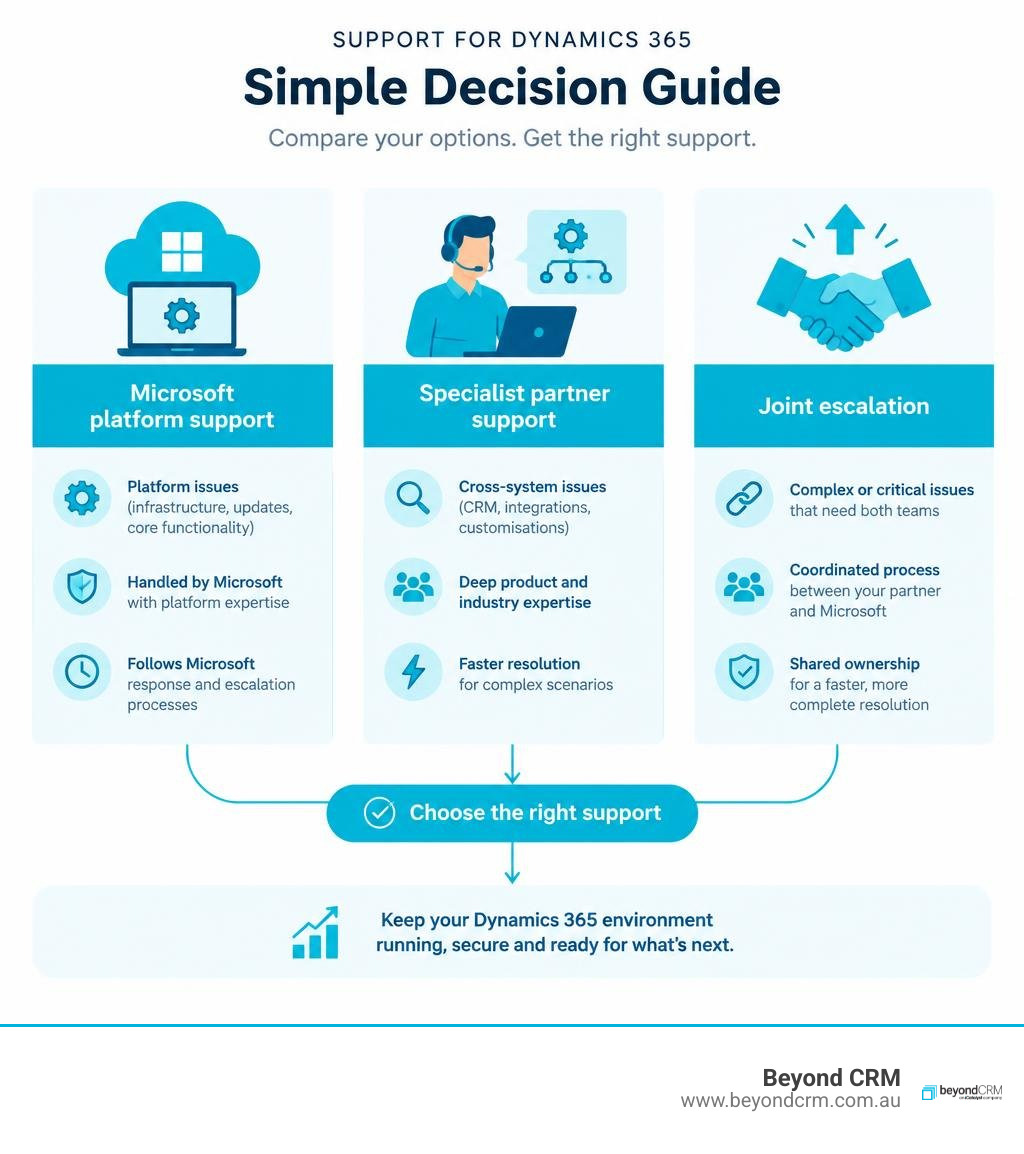
Coverage depends on your licensing, tenant configuration, implementation architecture, and support agreement. Microsoft support addresses core platform issues, while specialist partners investigate complex CRM configurations and connected applications.
I’m Warren Davies, Founder of BeyondCRM. I have more than 30 years of CRM consulting experience. My focus is helping organisations make practical decisions about Dynamics 365 support, from day-to-day incident handling to the governance needed for complex connected environments.
Key Takeaways for Dynamics 365 Support Models
Selecting an effective support framework ensures platform uptime and protects custom system investments. The right support model aligns technical capabilities with organisational operational demands.
- Coverage Scope Dictates Resolution Speed: Microsoft direct support addresses platform-level outages, whereas specialist partners handle custom code, plugins, and integrated external databases.
- Service-Level Agreements Require Business Context: Robust service-level agreements (SLAs) must define response targets tied to business impact rather than generic ticket counts.
- Preventive Maintenance Protects Cloud Investments: Ongoing release wave testing and proactive sandbox validation minimise operational disruption caused by automatic Microsoft updates.
- Support Models Must Accommodate Hybrid Systems: Support arrangements must incorporate connected enterprise resource planning (ERP) platforms, identity systems, and custom line-of-business applications.
- Commercial Flexibility Improves ROI: Structuring support through blended models, such as call-off credits, helps contain maintenance overhead while retaining tier-3 technical consulting.
Evaluating Support for Dynamics 365: Microsoft Direct vs Specialist Partners

Selecting an operational maintenance framework requires understanding where native cloud obligations end and custom architecture begins. Microsoft maintains base infrastructure uptime, while specialist consulting partners support bespoke business logic, integrations, and user workflows.
Enterprise CRM solutions contain bespoke business logic, custom Dataverse tables, third-party connectors, and departmental security profiles. When an operational failure occurs, identifying the root cause determines which channel can deliver a resolution.
An unhandled exception in a custom plugin falls outside the scope of base subscription support. Conversely, platform-wide service degradation across cloud infrastructure requires direct vendor engineering intervention.
| Evaluation Metric | Microsoft Standard Support | Microsoft Unified Support | Specialist Consulting Partner |
|---|---|---|---|
| Primary Scope | Out-of-the-box product break-fix and cloud service uptime | Organisation-wide Microsoft estate support and advisory | Custom architecture, business logic, integrations, and user guidance |
| Customisation Coverage | Excluded; points to developer documentation | Advisory scope depending on contract terms | Direct debugging, code remediation, and workflow refactoring |
| System Context | Generic tenant visibility without business context | Broad infrastructure oversight across enterprise accounts | Deep architectural familiarity with configured processes |
| Integration Triage | Limited to standard native connectors | Broad technical guidance across Microsoft services | End-to-end investigation spanning non-Microsoft endpoints |
| Release Governance | Automated platform deployment schedules | Release advisory and technical account management | Sandboxed regression testing, impact analysis, and validation |
Core Support Options and Service Tiers
Standard subscription agreements provide entry-level access to administrative portals where technical administrators log service requests. These services focus on tenant provisioning, service health incidents, and core billing inquiries.
Official Microsoft Dynamics 365 documentation and vendor escalation channels remain vital when diagnosing underlying infrastructure faults or platform-level service interruptions. Entry-level ticketing arrangements often require internal IT teams to isolate issues before submission.
Tiered enterprise plans introduce dedicated Technical Account Managers and accelerated initial response targets. These frameworks assist global enterprises with broad Microsoft estates, though internal technical resources still manage bespoke development layers.
When to Choose Specialist Partner Support for Dynamics 365
Complex operating environments frequently require specialised partner governance. These environments feature multi-layered Dataverse architectures, sensitive compliance requirements, and complex integrations with financial systems or legacy databases.
Engaging dedicated specialist support allows organisations to bridge the gap between platform infrastructure and operational reality. At BeyondCRM, our consulting model focuses on understanding your operational workflows.
When a user encounters a data synchronisation fault or broken approval pipeline, our team investigates the complete system path. We work hand-in-hand with existing internal IT teams and third-party software providers to support your broader technology environment.
Essential Services Included in Modern Dynamics 365 Support Plans

Modern Dynamics 365 support covers reactive incident remediation, proactive release governance, continuous system optimisation, and technical advisory services. These combined disciplines maintain operational health and user adoption across evolving cloud environments.
Effective support frameworks incorporate four key disciplines:
- Reactive Incident Remediation: Diagnosing unexpected errors, rectifying plugin failures, resolving security role permission conflicts, and addressing business process halts.
- Preventive Release Governance: Analysing upcoming platform release waves, testing critical operational pathways in sandbox environments, and adjusting deprecated script libraries.
- Continuous System Optimisation: Refining system views, streamlining slow-running queries, fine-tuning form layouts, and updating workflow steps to reflect operational adjustments.
- Advisory and Knowledge Transfer: Providing structured functional guidance to system administrators, advising on architectural best practices, and helping internal teams build self-sufficiency.
Incident Management, Release Cycles, and Platform Maintenance
Microsoft’s Dynamics 365 release schedule has historically organised planned updates into two annual release waves, alongside service updates. Because Microsoft can change release communications and availability by product, organisations should confirm the current schedule for their licensed applications and test relevant changes before production rollout.
Automated updates can occasionally introduce regressions into bespoke scripts, custom JavaScript web resources, or asynchronous workflows. Proactive support agreements mitigate this risk through structured release management.
Technical specialists validate mission-critical paths within isolated non-production sandboxes before production deployment occurs. Support teams also monitor verified technical resolutions within official platform community forums to identify emerging platform behaviours.
A useful release-readiness process starts with an inventory of critical journeys rather than a generic test list. For example, a team may test lead-to-opportunity conversion, case routing, approval flows, security-role changes, document generation, and the integrations that pass customer or operational data between systems. Each test should identify an owner, expected result, dependency, and fallback action. Recording those decisions gives internal teams, BeyondCRM, and other IT solution providers a shared basis for prioritising remediation when an update affects a connected workflow.
Managing Customisations, Integrations, and Cloud Transitions
Enterprise implementations often rely on extensions, such as Power Automate cloud flows and custom REST API endpoints connecting to operational databases. Maintaining these integrations requires technical oversight across the entire data pipeline.
When a connected service updates its authentication protocols or changes an API payload structure, the CRM integration layer must adapt accordingly. Support teams maintain source control repositories, document entity relationships, and manage solution layer dependencies.
Whether an organisation is resolving technical debt or maintaining hybrid connectivity, structured Dynamics 365 integration ensures that core business workflows continue operating without disruption.
Best Practices for SLA Design, Ticket Prioritisation, and Cost Optimisation
Effective service-level agreements define response and resolution targets based on operational severity and direct business impact. The response ranges below are illustrative planning targets, not standard Microsoft commitments; actual obligations should be agreed in the relevant support contract. Structured triage frameworks ensure critical system stoppages receive immediate senior technical attention.
Standard response metrics that measure how quickly a helpdesk acknowledges a ticket provide little comfort if critical operational bottlenecks remain unresolved. Well-structured support agreements establish clear severity matrices aligned with actual business impact.
| Severity Tier | Operational Definition | Target Initial Response | Action Plan and Escalation Profile |
|---|---|---|---|
| Severity 1 (Critical) | Core system inaccessible, complete operational stoppage, severe data integrity risk with no practical workaround. | Under 1 hour | Immediate triage by senior technical consultants, continuous engineering until restored or mitigated. |
| Severity 2 (High) | Major business functionality impaired, significant user group blocked, time-sensitive process affected with temporary workaround. | 2 to 4 hours | Senior consultant assignment, direct collaboration with department leads, scheduled progress updates. |
| Severity 3 (Medium) | Non-critical component degraded, isolated functional error, business operations continue with minimal disruption. | 8 business hours | Standard technical investigation, functional testing in sandbox, resolution scheduled within normal release cycles. |
| Severity 4 (Low) | Minor cosmetic issue, administrative guidance request, routine user access change, or general configuration query. | 1 to 2 business days | Logged for routine administrative processing or handled via structured call-off consulting hours. |
Structuring SLAs and Escalation Paths for Business Continuity
Designing a practical support framework requires defining clear escalation pathways between internal helpdesks, partner consulting teams, and Microsoft platform engineering. First-tier personnel capture essential diagnostics, including user security roles, record identifiers, error logs, and reproduction steps.
If internal triage confirms that the issue stems from bespoke business logic, the incident routes directly to designated partner consultants.
When an issue points to underlying cloud infrastructure performance anomalies, an experienced consulting partner manages vendor escalation on your behalf. This technical representation ensures vendor engineering receives complete diagnostic traces and environment telemetry without delay.
Maximising ROI on Technical Support for Dynamics 365
Managing ongoing operational costs requires balancing predictable retained support with flexible consulting capacity. Rigid support contracts that charge substantial fixed retainers regardless of monthly ticket volumes often yield poor financial returns during stable operational periods.
Relying purely on reactive ad-hoc billing can lead to unpredictable operational expenses when major platform updates or complex business changes occur.
Many organisations implement flexible call-off models paired with baseline maintenance agreements. This structure provides guaranteed SLA coverage for critical incidents while allowing unused hours to be allocated toward high-value proactive activities, including:
Before agreeing a support model, define what the monthly allowance includes and what triggers additional consulting work. A clear scope can distinguish routine administration, incident investigation, release testing, enhancement requests, vendor escalation, and out-of-hours coverage. It should also identify responsibilities for internal teams and external providers, especially where identity services, finance platforms, data warehouses, or specialist applications are involved. This avoids a common support gap: everyone can see the symptom, but no party owns the cross-system investigation needed to resolve it.
- Conducting database hygiene reviews and storage capacity audits.
- Refactoring legacy workflows into modern Power Automate flows.
- Delivering targeted training sessions for departmental power users.
- Reviewing security role configurations against organisational governance policies.
Frequently Asked Questions About Support for Dynamics 365
Dynamics 365 support encompasses vendor infrastructure coverage, partner consulting, and proactive system maintenance. Addressing common operational queries helps organisations choose the right service model.
What is the difference between standard Microsoft support and partner-led support?
Standard Microsoft support focuses on platform availability, underlying Azure infrastructure, and base product defects within out-of-the-box modules. It operates across broad product categories but does not cover custom code, bespoke plugins, tailored business logic, or third-party integrations.
Partner-led support provides end-to-end technical governance tailored to your specific deployment. A specialist partner understands your unique business processes, manages bespoke customisations, troubleshoots integrations with external databases, and acts as your technical advocate with Microsoft engineering.
How are custom workflows, integrations, and extensions supported during cloud updates?
Cloud update governance requires a structured release management process. Before Microsoft deploys automated updates to a production tenant, support teams validate custom workflows, API endpoints, and JavaScript extensions within an updated sandbox environment.
This process identifies deprecated components, validates data synchronisation across external connectors, and ensures custom forms render properly. If a platform update affects bespoke code, consultants modify and test the solution package before production deployment, preventing workflow disruptions.
How can enterprise organisations optimise Dynamics 365 support costs?
Organisations can optimise support expenditure by establishing a tiered support model that aligns technical complexity with the appropriate resolution resource. Handling basic administrative tasks, such as password resets and standard view creation, through internal tier-1 teams reduces external ticket volumes.
Pairing internal triage with a flexible partner agreement that uses call-off credits allows businesses to direct professional consulting hours toward complex architectural challenges, release governance, and custom development rather than routine administrative requests.
Conclusion: Selecting the Right Support Model for Long-Term CRM Success
Selecting an effective Dynamics 365 support model ensures system stability, ongoing compliance, and alignment with business processes. Balancing platform coverage with specialist consulting protects your software investment over the long term.
System stability, integration reliability, and user satisfaction result from clear governance, structured release management, and support agreements tailored to your operating environment.
Specific Dynamics 365 functionality, automated capabilities, and integration performance depend on your underlying licensing tiers, tenant configuration, implementation architecture, and environmental security controls. No two enterprise deployments are identical, and support arrangements must reflect your specific connected applications and operational workflows.
Whether your team is managing a complex enterprise platform or connecting CRM data with operational systems across your technology estate, choosing the right partner ensures your investment remains secure and adaptable.


