

Membership renewal automation in Dynamics 365 explained
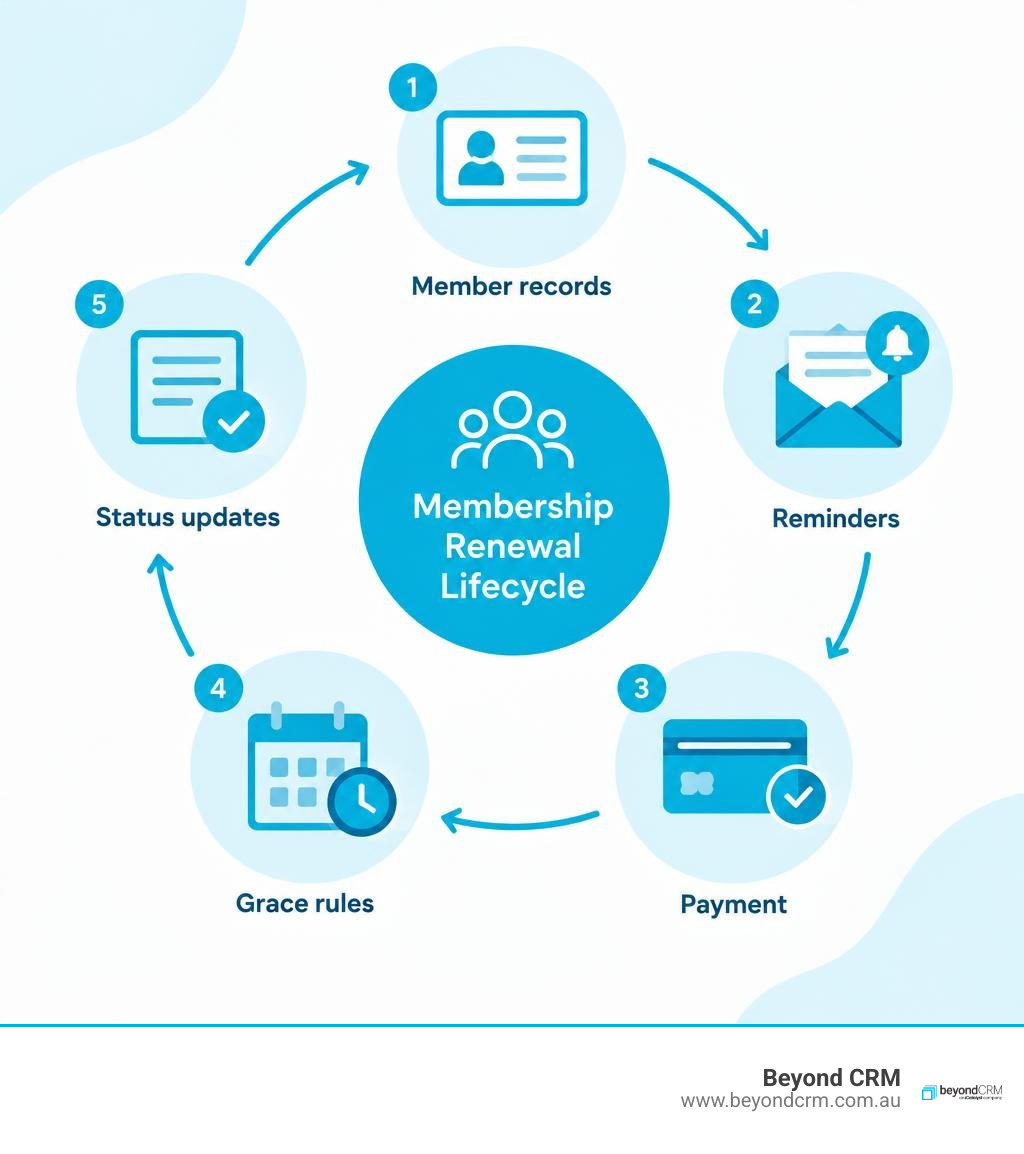
Microsoft Dynamics 365 can support membership renewal automation by coordinating member records, renewal dates, reminders, invoices, payment status, and entitlement changes in one connected process. The practical aim is to give staff a clear exception queue while routine renewals follow agreed business rules.
A well-designed process starts with reliable member data and documented renewal policy. It then connects reminders, billing, payment outcomes, grace periods, and reporting. Exact capabilities depend on licensing, tenant configuration, implementation design, integrations, Microsoft service availability, and security settings.
Membership renewal automation does not require replacing every existing finance, payment, or member-facing system. BeyondCRM works with internal IT teams and other providers to connect Dynamics 365 with the tools an organisation already relies on.
I’m Warren Davies, Founder of BeyondCRM. With more than 30 years of CRM experience, I help organisations design Dynamics 365 renewal processes that fit their membership rules, connected systems, and operational responsibilities.
Key Takeaways
Membership renewal automation gives organisations a repeatable way to manage renewals, payment exceptions, and member access without relying on individual staff members to remember each step.
- Define renewal status, ownership, reminder timing, grace rules, and escalation paths before configuring workflows.
- Use one reliable member record to coordinate billing history, communication preferences, payment outcomes, and entitlement status.
- Treat failed payments as an exception process with reminders, secure payment-update options, retries where supported, and human follow-up where needed.
- Give members a self-service path for updating payment details, invoices, and contact information.
- Track renewal conversion, failed-payment recovery, overdue renewals, and manual exceptions to improve the process over time.
Manual and automated membership renewal processes
Automated renewal processes give staff a consistent sequence for reminders, invoices, payment outcomes, and membership status changes. Manual processes can still work for small volumes, but they rely more heavily on spreadsheets, inboxes, and individual follow-up.
| Operational area | Manual renewal process | Automated renewal process |
|---|---|---|
| Member data | Spreadsheets and separate email lists | A managed member record with renewal and status fields |
| Billing and invoicing | Staff prepare invoices individually | Invoices can be created from agreed renewal rules |
| Payment review | Staff reconcile bank and gateway results | Payment outcomes can update a workflow or exception queue |
| Failed payments | Problems may be found during a later review | Staff can receive a prompt to start the agreed recovery process |
| Grace periods | Access changes depend on staff availability | Configured rules can flag or apply the next status step |
| Audit trail | Information is spread across files and inboxes | Relevant activity can be recorded against the member profile |
Why membership renewal automation reduces avoidable administration
When staff must remember each reminder date, cross-reference payments, and adjust expiry dates manually, delays and inconsistent follow-up become more likely. The operational benefit of automation is not removing people from the process. It is reducing repetitive checking so people can focus on exceptions and member conversations.
A practical example is a lapsed card. The system may flag the failed transaction, send an approved reminder, and create a task for the responsible team. Staff still decide how to handle complex cases, sensitive accounts, and policy exceptions.
Centralising member records in Dynamics 365
Membership renewal automation depends on accurate data. Dynamics 365 can act as the central record for member identity, membership tier, renewal date, communication preferences, payment status, and service history when configured for that operating model.
For organisations with annual fixed-date cycles and rolling anniversary renewals, the data model should identify the renewal basis, current status, next action, and responsible owner. Security roles should limit access to sensitive information, especially when payment systems and personal data are connected.
BeyondCRM can connect Dynamics 365 with existing databases, event platforms, accounting software, and payment services. The design should clarify which system is the source of truth for each field before integrations are configured.
Building a membership renewal workflow in Dynamics 365
A membership renewal workflow should define what happens before a renewal date, after an invoice is issued, when payment succeeds, and when payment fails. The workflow works best when business rules are agreed before automation is built.

Dynamics 365 and Power Automate may coordinate CRM updates, notifications, tasks, and connected services where the required connectors, permissions, and configuration are in place. A membership CRM provides the member-record foundation for this process. Microsoft describes Power Automate as a service for creating automated workflows between applications and services in its Power Automate documentation.
A detailed process map should show the trigger, communications, payment outcome, staff owner, and status change for each renewal scenario.
Set renewal triggers, reminders, and invoices
Start by recording the event that makes a renewal due. This may be an anniversary date, a fixed annual cycle, a membership status change, or a contract milestone. Each rule should state the responsible team, the message sequence, and the action required if a member does not respond.
A common cadence includes an early reminder, a due-date notice, and a follow-up during the grace period. The exact timing should reflect the organisation’s membership model rather than a generic schedule.
Email templates can use approved record data such as the member name, membership tier, renewal amount, and payment instructions. If an organisation requires tax invoices or accounting records, confirm whether these are produced in Dynamics 365, an accounting platform, or an integrated service.
Manage failed payments, dunning, and grace periods
A failed payment process should be clear, polite, and measurable. It usually needs a payment status from the gateway, a member notification, a secure route to update payment details, and a staff task when automated recovery does not resolve the issue.
- Detect the outcome: Pass an approved payment status back to the member record or exception queue.
- Notify the member: Send a clear message that explains the next step without exposing sensitive payment data.
- Offer an update path: Direct the member to an authenticated portal or payment page where supported by the connected system.
- Apply retries carefully: Any retry schedule must reflect gateway capability, member consent, and organisational policy.
- Use a defined grace period: Keep, restrict, or suspend access according to agreed entitlement rules.
- Escalate exceptions: Assign complex cases to staff before a final status change is made.
This approach helps staff distinguish routine payment recovery from cases that need personal contact or policy review.
Support self-service and payment updates
A secure member portal can reduce routine enquiries by letting members update contact details, view invoices, check membership status, or follow the approved payment-update process. The available options depend on the portal, payment provider, identity controls, and integration design.
For recurring card payments, payment providers commonly use tokens rather than placing card numbers in a CRM record. This supports safer system boundaries, but organisations must still confirm their own security, privacy, and payment-compliance obligations.
BeyondCRM’s member self-service portal guide outlines useful portal capabilities to assess before a renewal workflow goes live.
Implementing and measuring membership renewal automation
Implementation should turn documented membership policy into tested workflow rules, integration requirements, and staff procedures. The goal is a process that handles common renewals consistently and makes exceptions visible early.

A practical implementation checklist
- Map the current process: Document renewal dates, membership tiers, payment methods, grace periods, approval points, and communications.
- Clean member data: Resolve duplicate records, missing contact details, invalid expiry dates, and conflicting membership statuses.
- Define system ownership: Specify whether Dynamics 365, the accounting system, the payment gateway, or the member portal owns each important data point.
- Configure the workflow: Set up statuses, tasks, notifications, and integrations to match approved business rules.
- Test realistic scenarios: Include successful renewal, overdue invoice, failed card, payment update, cancellation, reinstatement, and manual exception handling.
- Prepare staff: Give teams clear responsibilities, escalation rules, and reports before the process is released.
Which membership renewal metrics matter?
Renewal reporting should help leaders identify where members drop out and where staff time is being consumed. Useful measures include:
- Renewal rate: The share of eligible members who renew during the defined renewal window.
- Involuntary churn: Non-renewals caused by unresolved payment or process issues rather than a deliberate cancellation.
- Failed-payment recovery rate: The share of failed payments that are resolved before the member’s access changes.
- Time to resolution: How long payment exceptions and renewal queries remain open.
- Manual exception volume: The number of renewals that need staff intervention, grouped by cause.
Review these measures against the workflow design, not in isolation. A rise in exceptions may point to poor data quality, unclear messages, a portal issue, or a payment integration problem rather than a problem with member demand.
Membership renewal automation FAQs
These answers address common implementation, evaluation, and operating questions about membership renewal automation in Dynamics 365.
What is membership renewal automation?
Membership renewal automation is a connected set of rules and workflows that manages renewal dates, notices, invoices, payment outcomes, member status, and staff exceptions. It does not mean every action is automatic. Teams still need ownership for exceptions, policy decisions, and member support.
Can Dynamics 365 automate membership renewals?
Dynamics 365 can support membership renewal processes when the required data model, workflows, integrations, permissions, and licensing are in place. Many organisations also use Power Automate, a payment gateway, accounting software, and a member portal as part of the solution.
How should a membership system handle failed payments?
A good failed-payment process records the outcome, notifies the member securely, offers an approved way to update payment details, and gives staff a clear escalation path. The timing of retries, reminder messages, and any grace period should follow organisational policy and the payment provider’s capabilities.
What should a member self-service portal include?
At a minimum, consider secure access to contact details, membership status, invoices, renewal instructions, and approved payment-update options. Organisations with more complex membership models may also need tier changes, event registrations, family or corporate relationships, and support requests.
What should be automated first in a membership renewal process?
Start with the highest-volume, lowest-risk steps. Many organisations begin with accurate renewal-date tracking, reminder tasks, standard notices, and a report for overdue renewals. Add payment and entitlement automation only after the underlying data and exception process have been tested.
Is Dynamics 365 suitable for membership organisations?
Dynamics 365 can be suitable when an organisation needs configurable member records, connected processes, reporting, and integration with existing systems. Suitability depends on the membership model, internal skills, data quality, budget, security requirements, and the systems that must remain connected.
Membership renewal automation: practical next steps
Membership renewal automation is most effective when it reflects real membership policy rather than a generic workflow template. Start with accurate member data, clear status rules, a tested failed-payment process, and defined staff ownership for exceptions.
Microsoft Dynamics 365 can provide the CRM foundation for this work, subject to licensing, configuration, integration architecture, and security settings. BeyondCRM helps organisations connect Dynamics 365 with their existing finance, portal, event, and payment systems, so the renewal process supports the wider technology environment rather than forcing a complete replacement.
The next useful step is to map the renewal journey from the member’s first reminder through payment, grace periods, and final status. That exercise often reveals the data, integration, and communication decisions that should be resolved before workflows are configured.


